
Inbox Triage finds the senders burying you, cleans them out easily, and keeps your inbox clean.
Inbox Triage operates fully privately, on your own Mac or PC.
- Runs on your Mac or PC
- Nothing uploaded
- Deletes go to Trash
- Works with Gmail, Outlook and IMAP
Relief from the chaos
932 unread, and most of it isn't for you.
The real app
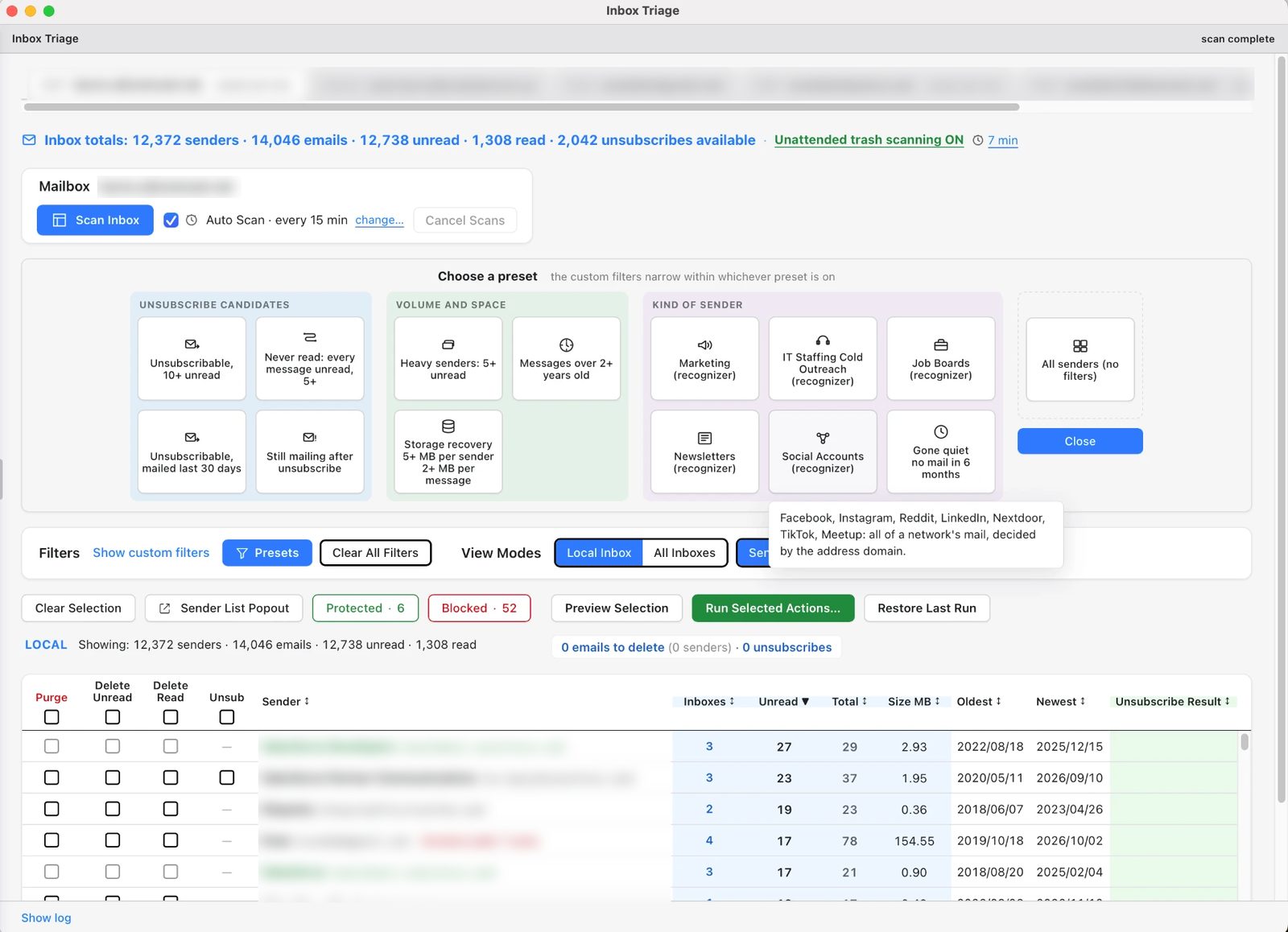
Every sender, ranked. One decision at a time.
Inbox Triage lists who sends you the most mail, with presets for marketing, newsletters, storage hogs and senders still mailing after you unsubscribed. Pick what to delete, unsubscribe or block, preview it, then run it.
Other inbox cleaners ask you to hand over the keys to your mailboxes.
Typical cloud-based inbox cleaners
- Your mail is read and analyzed on the company's servers.
- Automation and rules run on their infrastructure.
- Classification is done by opaque models you can't inspect.
- Your account stays connected to their service.
Inbox Triage
- Scanning, analysis and cleanup run on your computer.
- On Gmail and Microsoft accounts, blocking rules live in your own mailbox, so they run 24/7 with no third-party server involved. On IMAP accounts, blocking runs when you scan.
- Classification is a transparent rule-based engine on your machine, and every flag comes with a plain-language reason.
- No mail content, subject lines or sender lists are ever sent to us or to any AI service.
Local-only processing
Inbox Triage scans your Inbox with the app running on your computer. Sorting, ranking and cleanup all happen there, not on a server of ours.
No cloud AI
We deliberately don't send your mail to an AI model. The classifier is rule-based and runs entirely on your device.
Explainable, not mysterious
Every flagged sender shows the reasons behind the flag. You can check the logic before you act on it.
Why flaggedIllustration - Has an unsubscribe header
- Sent 214 messages, you opened none
- Marketing language in subjects
Recoverable by design
Deletes go to Trash or Deleted Items, never permanent deletion. Scans are limited to the Inbox, and Sent mail is never touched.
How it works
Connect your account
Sign-in happens between your computer and your mail provider. Gmail, Outlook / Microsoft 365 and IMAP are supported.
Review and Analyze senders
Filter and sort in a multitude of dimensions to identify the biggest piles of unwanted emails to act on.
Delete or unsubscribe
Act on one sender or many at once: send their mail to Trash or unsubscribe, then watch the verification result to confirm it actually worked.